Cover image (poster) guidelines
The cover image is the showcase for your content. It appears in listings, on the detail page and in social media shares.
Technical requirements
- Format: JPG, PNG or WebP.
- File size: Up to 8 MB per image.
- Requirement: A cover is required for events, venues and accommodation. For activities, a cover is optional but strongly recommended.
- Upload permission: Images are uploaded by the business owner's account.
Recommended size and aspect ratio
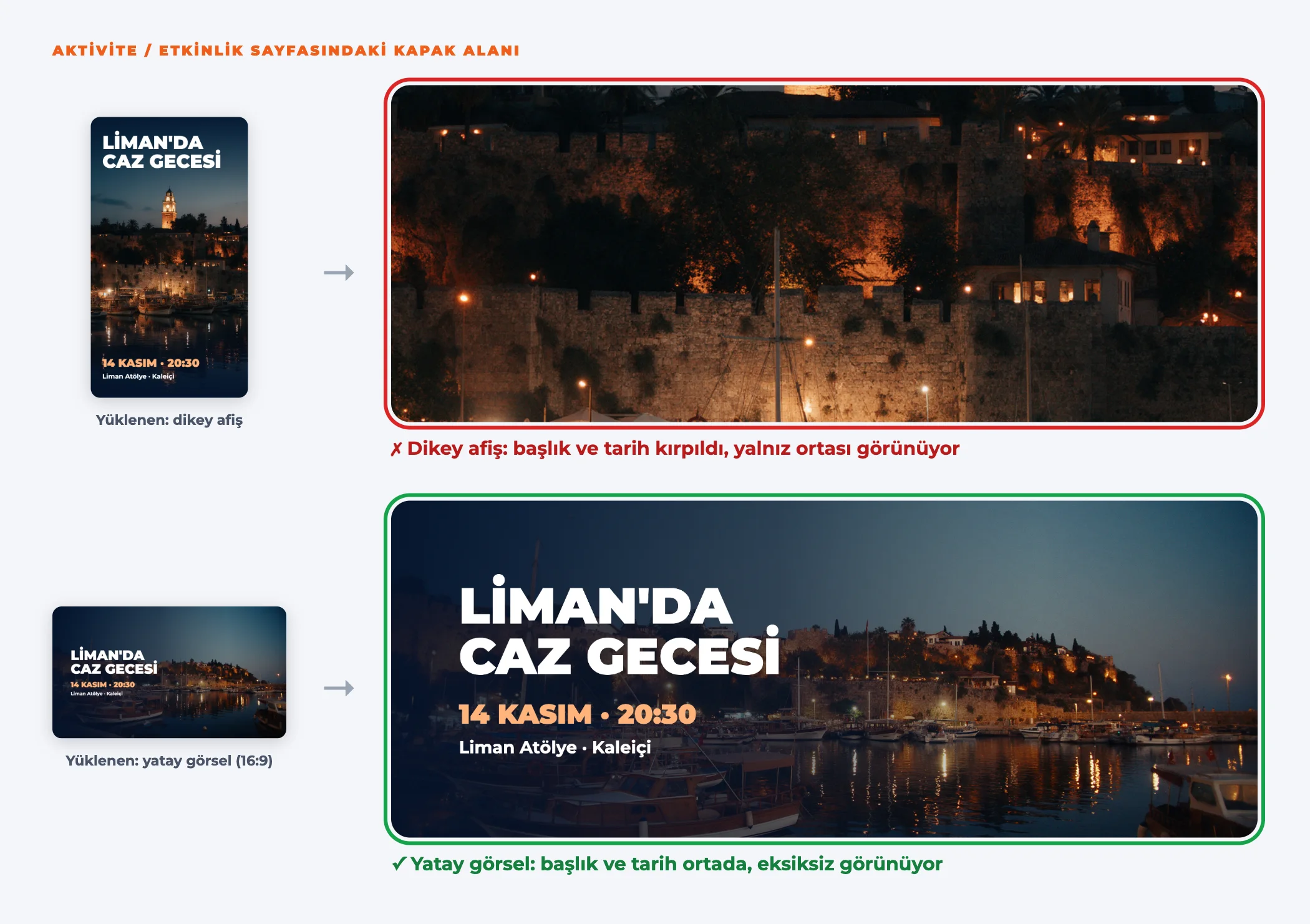
The cover area on the detail page is landscape and wide. The image is cropped to fill this area.
For best results
- Use a landscape image: 16:9 aspect ratio, at least 1600 × 900 pixels (ideally 1920 × 1080).
- Place key elements in the center: Keep titles, faces and logos in the middle of the image. The edges, especially the top and bottom, may be cropped depending on screen size.
- Don't put too much text on the image: The event name and date are already shown on the page.
Portrait posters
Portrait (vertical) posters are cropped at the top and bottom in the cover area. Prepare a landscape version of your poster or add the portrait poster to the gallery. As the cover, you can use a landscape section of the artwork on your poster.
Quality checklist
- Is the image sharp? It should not be blurry, pixelated or watermarked.
- Is it the original file, rather than a screenshot of another website or an Instagram post?
- Do you have the right to use the image? The checkbox in the form asks you to confirm this.
- Are the key elements in the center?
- Is the file smaller than 8 MB?
Gallery
After the cover, you can add more photos to the gallery:
| Content type | Total images |
|---|---|
| Event | 10 (including the cover) |
| Venue and accommodation | 1–10 photos |
Choose different angles that show your venue's interior, its atmosphere and your products.